Direct use: interview and pre-screening workflows
Written By Jozef
Last updated 3 months ago
"Direct use" means candidates move through JobMojito itself, invited by email or applying from a public listing, with no ATS in the loop. You can run this entirely from the JobMojito admin, or let an AI agent handle the busywork (creating interviews, sending invitations, pulling analytics) through the JobMojito MCP server. Either way, the final call on a candidate is always made by a person.
There are two versions of this flow depending on whether you add a pre-screening gate before the AI interview.
Interview
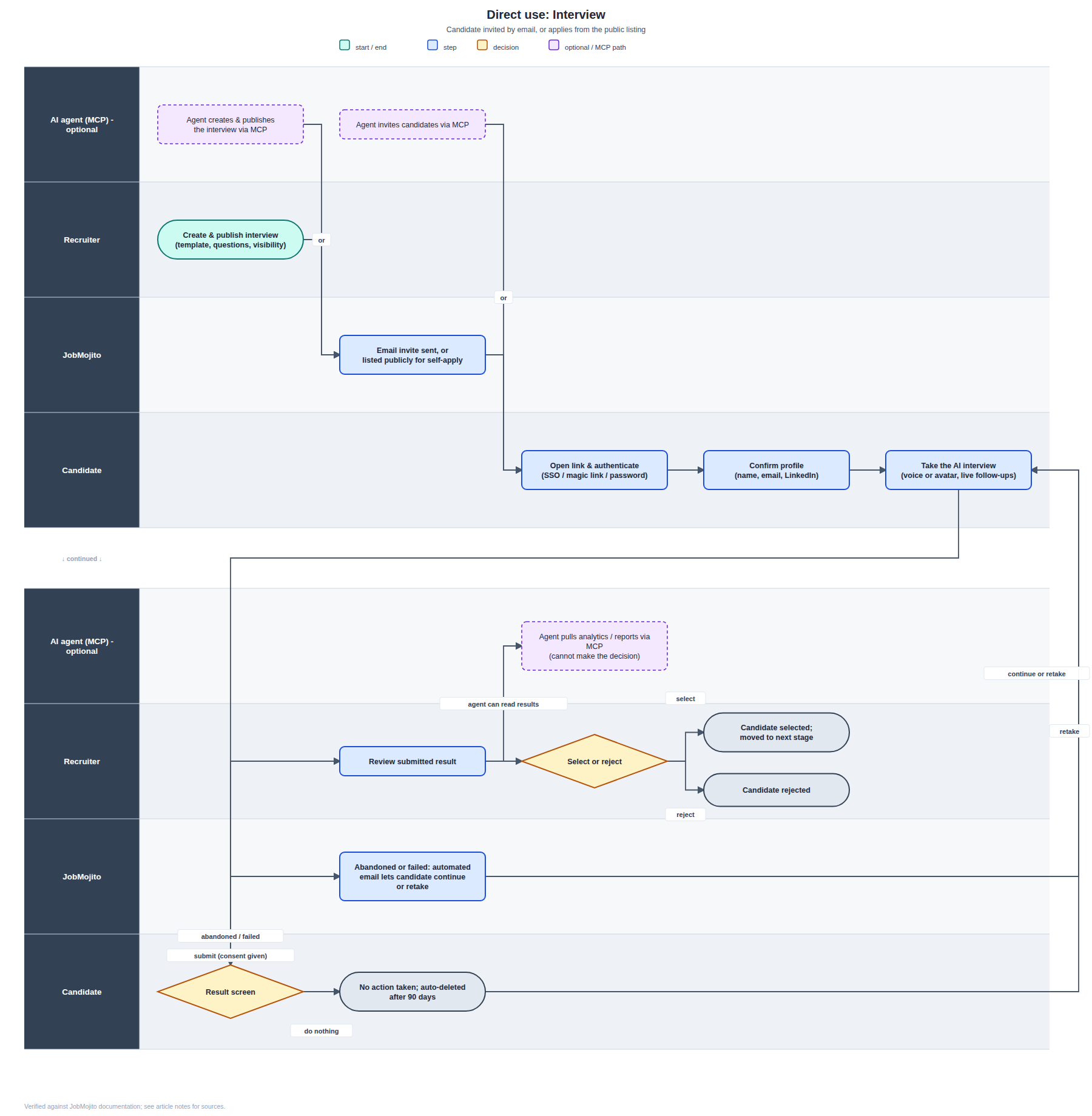
Use this when every invited or applying candidate should go straight to the AI interview, with no qualifying step first.
Create & publish the interview. In the admin, pick a template (voice-only or avatar), write or generate the questions, and set visibility: invite-only or a public listing candidates can apply to directly.
Candidate is reached. JobMojito either emails the invitation or lists the role publicly so candidates can self-apply.
Candidate authenticates. JobMojito handles sign-in via single sign-on, a magic link, or a new password. Email is the primary identifier, so the same person landing via different methods still resolves to one account.
Candidate confirms their profile: name, email, and LinkedIn, since there's no pre-screening form in this flow.
Candidate takes the AI interview. They talk with a real-time avatar or voice agent; JobMojito generates context-aware follow-up questions on top of the predefined set.
If the session is abandoned or fails (network issues, no speech detected, and so on), JobMojito automatically emails the candidate so they can continue where they left off or retake the interview, rather than the session just dying quietly.
Candidate reaches the result screen and chooses to submit (with consent), retake if attempts remain, or do nothing, in which case an incomplete session is auto-deleted after 90 days on enterprise plans, though the candidate can still log back in within that window to submit it.
Recruiter reviews the submitted result and records Select or Reject. This decision step is always a human action; JobMojito's scoring is decision support, not a hiring decision.
Optional: an AI agent via MCP
If you connect an AI agent to the JobMojito MCP server, it can create and publish the interview (step 1), send invitations (step 2), and pull analytics or generate reports once results come in, all under your own account permissions. What it cannot do is make the Select/Reject call in step 8; that stays with a human reviewer. If you're using an agent to prepare anything candidate-facing, remember to disclose that AI is used in the process.
Pre-screening with interview
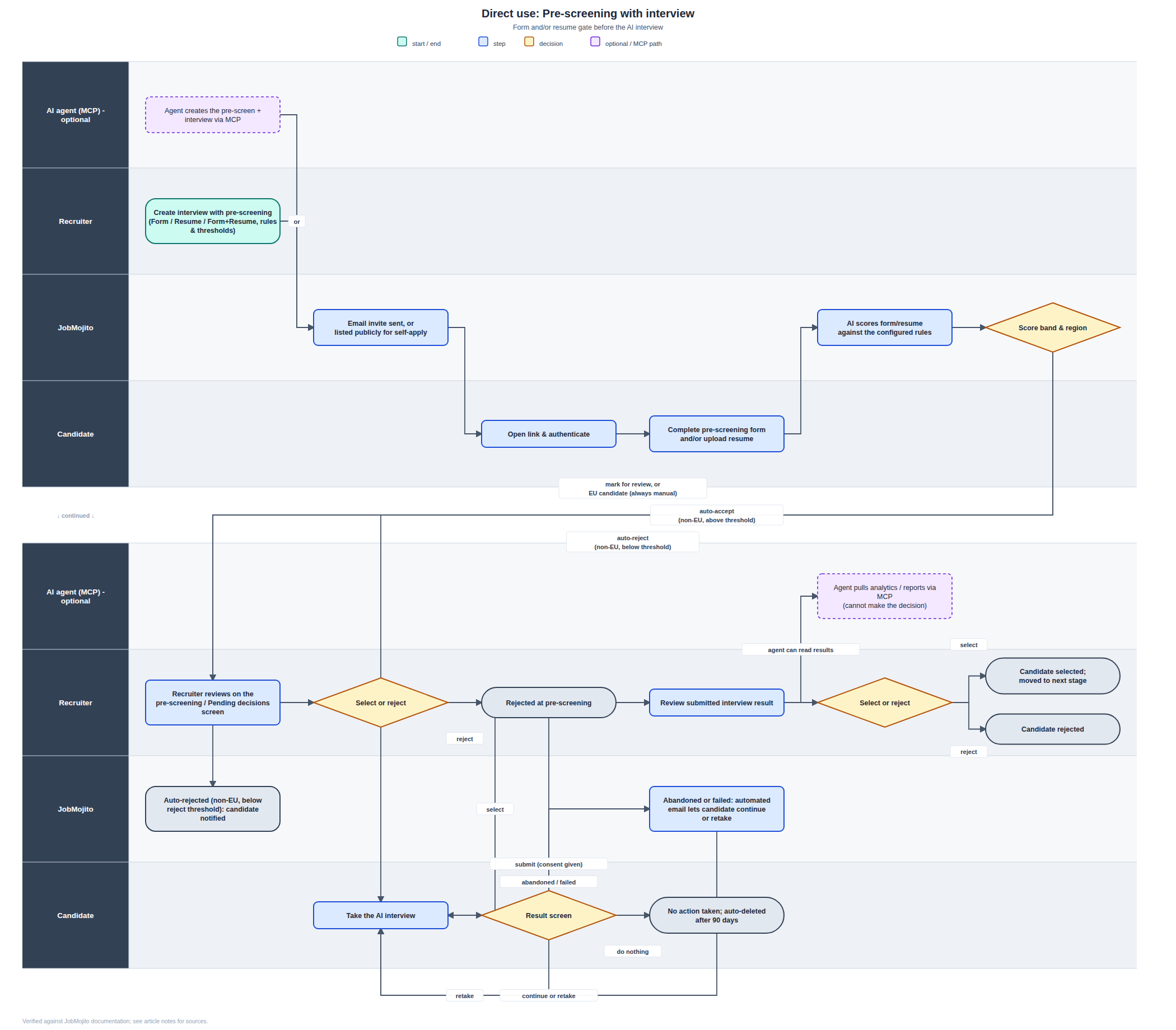
Use this when you want to qualify candidates, via a short form, a resume, or both, before spending an interview slot on them.
Create the interview with pre-screening enabled, choosing one of three screening shapes: a qualifying form only, a resume-analysis block only, or both. You set the rules here too: which fields are collected, which are actually scored, and the accept/reject thresholds.
Candidate is reached the same way as above (email invite or public listing) and authenticates.
Candidate completes the pre-screening step: confirming details like nationality, residency, languages, education, or visa status (whichever you've enabled), and/or uploading a resume for AI analysis.
JobMojito scores the submission against your configured rules (resume match score, detected experience, form answers) and lands the candidate in one of three bands:
Above the accept threshold, non-EU candidate: auto-accepted straight into the interview.
Below the reject threshold, non-EU candidate: auto-rejected, and the candidate is notified.
In the middle band, or an EU/GDPR candidate: sent to a recruiter for manual review. This isn't just a policy choice; for EU candidates, JobMojito never makes the pre-screening decision automatically, a human always reviews.
If selected (automatically or by a recruiter), the candidate takes the AI interview. If the session is abandoned or fails, the same automated email and continue-or-retake option from the plain Interview flow applies here too.
The rest of the flow matches the plain Interview flow above: result screen, submit, recruiter reviews, Select or Reject.
Optional: an AI agent via MCP
Same scope as the plain Interview flow: an agent can create the pre-screened interview and send invitations, and can read back analytics and reports afterward. Every accept/reject decision, at pre-screening and at the final interview stage, is made by a person, never by the agent.
Was this helpful?
Still need help? Ask the team